

एआई कॉयर जेनरेटर: एआई के साथ समृद्ध स्वर सामंजस्य (वोकल हार्मोनी) बनाएं
जानें कि कॉयर (choirs) को क्या चीज़ लोकप्रिय बनाती है और एआई (AI) टूल की मदद से अपनी खुद की वोकल हार्मनी और लेयर्स बनाने के तरीकों को एक्सप्लोर करें।

पहले एक पूरा क्वायर (choir) साउंड तैयार करने का मतलब था - कई सारे शेड्यूल, स्टूडियो और एक भारी बजट के बीच तालमेल बिठाना। लेकिन एक AI क्वायर जनरेटर सिर्फ एक एकल वोकल रिकॉर्डिंग को ही पूरे क्वायर अरेंजमेंट में बदल देता है; कोई शेड्यूल नहीं, कोई सेशन कॉस्ट नहीं, बस तुरंत ही बेहतरीन हार्मनी तैयार।
मुख्य बातें (Key Takeaways)
एक AI क्वायर जनरेटर आर्टिफिशियल इंटेलिजेंस का उपयोग करके एक सिंगल वोकल रिकॉर्डिंग को लेयर्ड हार्मनी में बदल देता है, जो एक कंपलीट क्वायर जैसा सुनाई देता है। Kits AI के Harmony Generator की मदद से, आप 150 से अधिक रॉयल्टी-फ्री, नैतिक रूप से सोर्स की गई आवाज़ों की लाइब्रेरी का उपयोग करके चार अलग-अलग हार्मनी पार्ट्स बना सकते हैं। अतिरिक्त गहराई के लिए, इसके Layers फीचर की मदद से आप सात आवाज़ों को एक साथ स्टैक कर सकते हैं, जिससे आपको एक इमर्सिव और व्यापक क्वायर साउंड प्राप्त करने में मदद मिलती है। Harmony Generator और Layers, Kits AI की एक बेजोड़ विशेषता हैं, जो रियलिस्टिक और कस्टमाइज़ेबल क्वायर प्रोडक्शन के लिए इनोवेटिव टूल्स प्रदान करती हैं।
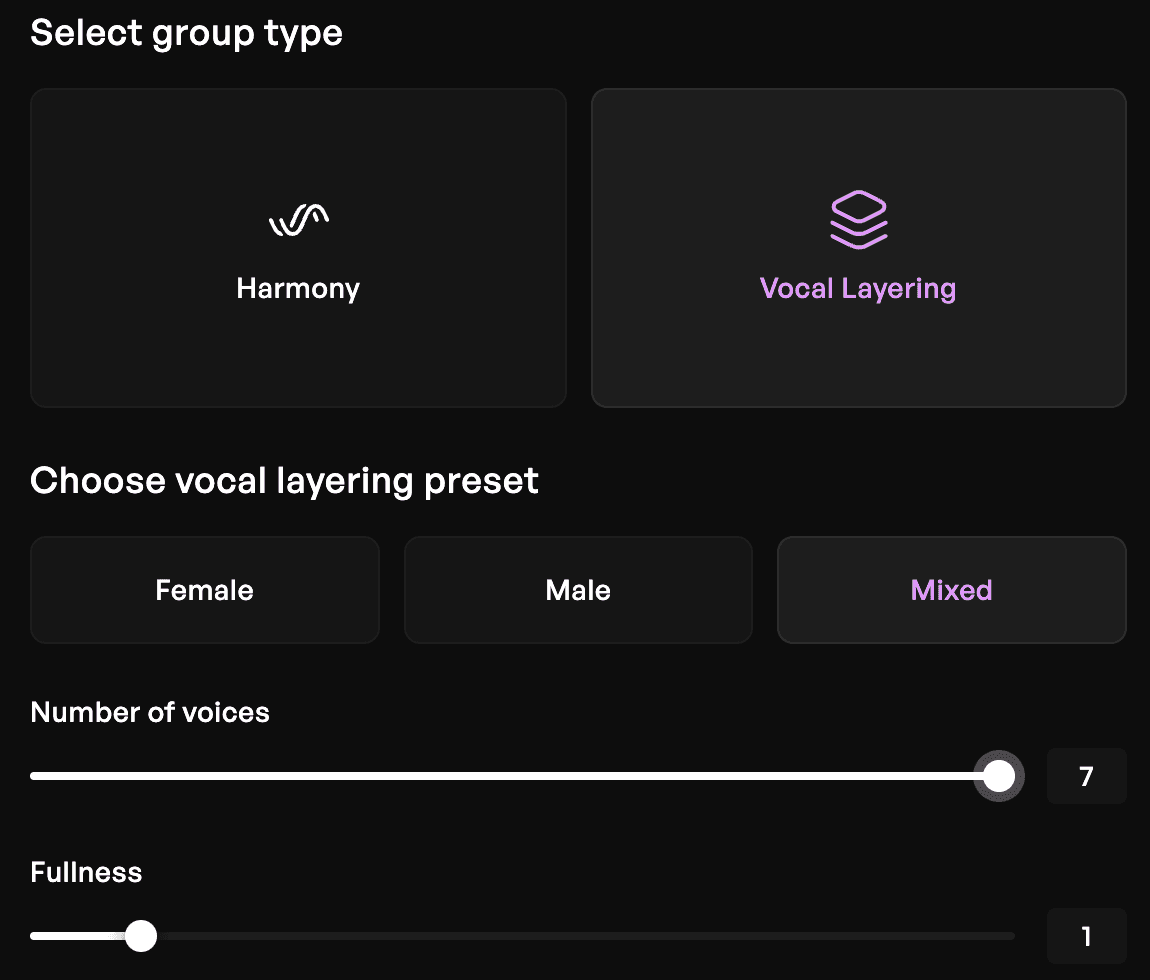
यह प्रक्रिया शेड्यूल कोऑर्डिनेट करने, स्टूडियो बुकिंग या एडवांस म्यूजिक थ्योरी की जानकारी रखने की आवश्यकता को समाप्त कर देती है, जिससे हर स्तर के प्रोड्यूसर के लिए क्वायर प्रोडक्शन आसान हो जाता है। सबसे अच्छी बात यह है कि Kits AI एक फ्री प्लान भी प्रदान करता है, ताकि आप तुरंत बिना किसी क्रेडिट कार्ड के क्वायर अरेंजमेंट बनाना शुरू कर सकें।
मुख्य शब्द (Key Terms)
एक AI क्वायर जनरेटर एक ऐसा टूल है जो एक या अधिक वोकल इनपुट से पूरे क्वायर को सिम्युलेट करने, लेयर्ड हार्मनीज़ और रिच वोकल टेक्सचर जेनरेट करने के लिए आर्टिफिशियल इंटेलिजेंस का उपयोग करता है। संगीत में, हार्मनी से तात्पर्य उन सुरों (नोट्स) से है जो गहराई और भावनात्मक जटिलता जोड़ने के लिए मुख्य धुन के साथ गाए जाते हैं, अक्सर लीड वोकल के ऊपर तीसरे या नीचे छठे इंटरवल का उपयोग किया जाता है। पारंपरिक क्वायर अरेंजमेंट अक्सर SATB मॉडल पर आधारित होते हैं, जिसका अर्थ है सोप्रानो (soprano), आल्टो (alto), टेनर (tenor) और बास (bass) - जो वोकल्स की चार मुख्य रेंज हैं।
वोकल्स की लेयरिंग (या स्टैकिंग) से तात्पर्य उन्हीं सुरों के साथ अधिक व्यापक और भरपूर साउंड बनाने के लिए कई आवाज़ों को एक साथ मिलाने से है।
एक अन्य मुख्य अवधारणा voice conversion (आवाज़ परिवर्तन) है, जहाँ AI मूल टाइमिंग और मेलोडी को सुरक्षित रखते हुए, मुख्य वोकल परफॉर्मेंस को अलग-अलग वॉयस मॉडल्स में बदल देता है।
AI क्वायर जनरेटर क्या है?
एक AI क्वायर जनरेटर एक ऐसा टूल है जो लेयर्ड वोकल हार्मनी बनाने के लिए आर्टिफिशियल इंटेलिजेंस का उपयोग करता है, जिससे एक ही वोकल रिकॉर्डिंग से पूरे क्वायर का प्रभाव पैदा होता है। ये टूल्स विशेष रूप से साधारण वोकल इनपुट से AI क्वायर बनाने के लिए डिज़ाइन किए गए हैं, जो यूज़र्स को वॉयस क्लोनिंग और वोकल कस्टमाइज़ेशन जैसे फीचर्स का लाभ उठाने की अनुमति देते हैं।
उन पारंपरिक क्वायर प्लगइन्स के विपरीत जो स्टैटिक सैंपल्स पर निर्भर करते हैं, AI-पावर्ड टूल्स आपके इनपुट पर डायनामिक रूप से रिस्पॉन्स करते हैं, जिससे वे आपकी मेलोडी, फ्रेज़िंग और टोन के अनुकूल ढल जाते हैं। इसका परिणाम ऐसी हार्मनी में मिलता है जो अधिक एक्सप्रेसिव और मुख्य परफॉर्मेंस से संगीत के माध्यम से जुड़ी महसूस होती हैं।
इन टूल्स के साथ काम करते समय आम तौर पर दो तरीके अपनाए जाते हैं। एक तरीका वोकल अपलोड करने और AI को उसके आसपास हार्मनीज़ जेनरेट करने की अनुमति देने का है, जिसे अक्सर वॉयस-टू-क्वायर वर्कफ़्लो कहा जाता है। दूसरा तरीका वॉयस मॉडल्स की लाइब्रेरी का उपयोग करके अरेंजमेंट बनाने पर केंद्रित है, जहाँ आप मैन्युअल रूप से विभिन्न वोकल रेंजों में हार्मनीज़ तैयार करते हैं। Kits AI इन दोनों तरीकों का समर्थन करता है, जिससे प्रोड्यूसर्स को अपनी क्रिएटिव प्रोसेस के अनुकूल काम करने की फ्लेक्सिबिलिटी मिलती है। जेनरेट किए गए ट्रैक्स को एक्सपोर्ट किया जा सकता है और विभिन्न म्यूजिक प्रोडक्शन के लिए उपयोग किया जा सकता है।
AI क्वायर जनरेटर कैसे काम करता है?
यह वास्तव में आपकी वोकल रिकॉर्डिंग की पिच, टाइमिंग और टोनल विशेषताओं का विश्लेषण करता है, और फिर परिभाषित हार्मनी इंटरवल्स के आधार पर एडिशनल वोकल पार्ट्स जेनरेट करता है।
यह प्रक्रिया कई प्रमुख तकनीकों पर निर्भर करती है। वॉयस मॉडलिंग AI को असली गायकों के टोन और रेंज सहित उनके अनूठे गुणों को समझने और दोहराने की अनुमति देती है। अलग-अलग वोकल विशेषताओं को कैप्चर करने के लिए AI वॉयस मॉडल्स को कस्टमाइज़ किया जा सकता है, जिससे यूज़र्स क्वायर के साउंड को अपनी विशिष्ट कलात्मक आवश्यकताओं के अनुरूप ढाल सकते हैं। हार्मनी इंटरवल्स लीड वोकल और जेनरेट किए गए प्रत्येक पार्ट के बीच संगीतमय संबंध निर्धारित करते हैं, जैसे कि लीड से एक सुर तीसरा ऊपर या एक ऑक्टेव नीचे रखना। वॉयस कन्वर्सेशन इसके बाद आपकी मूल मेलोडी को विभिन्न वॉयस मॉडल्स पर मैप करता है, जिससे ऐसा प्रभाव पैदा होता है जैसे कई गायक एक साथ परफॉर्म कर रहे हों।
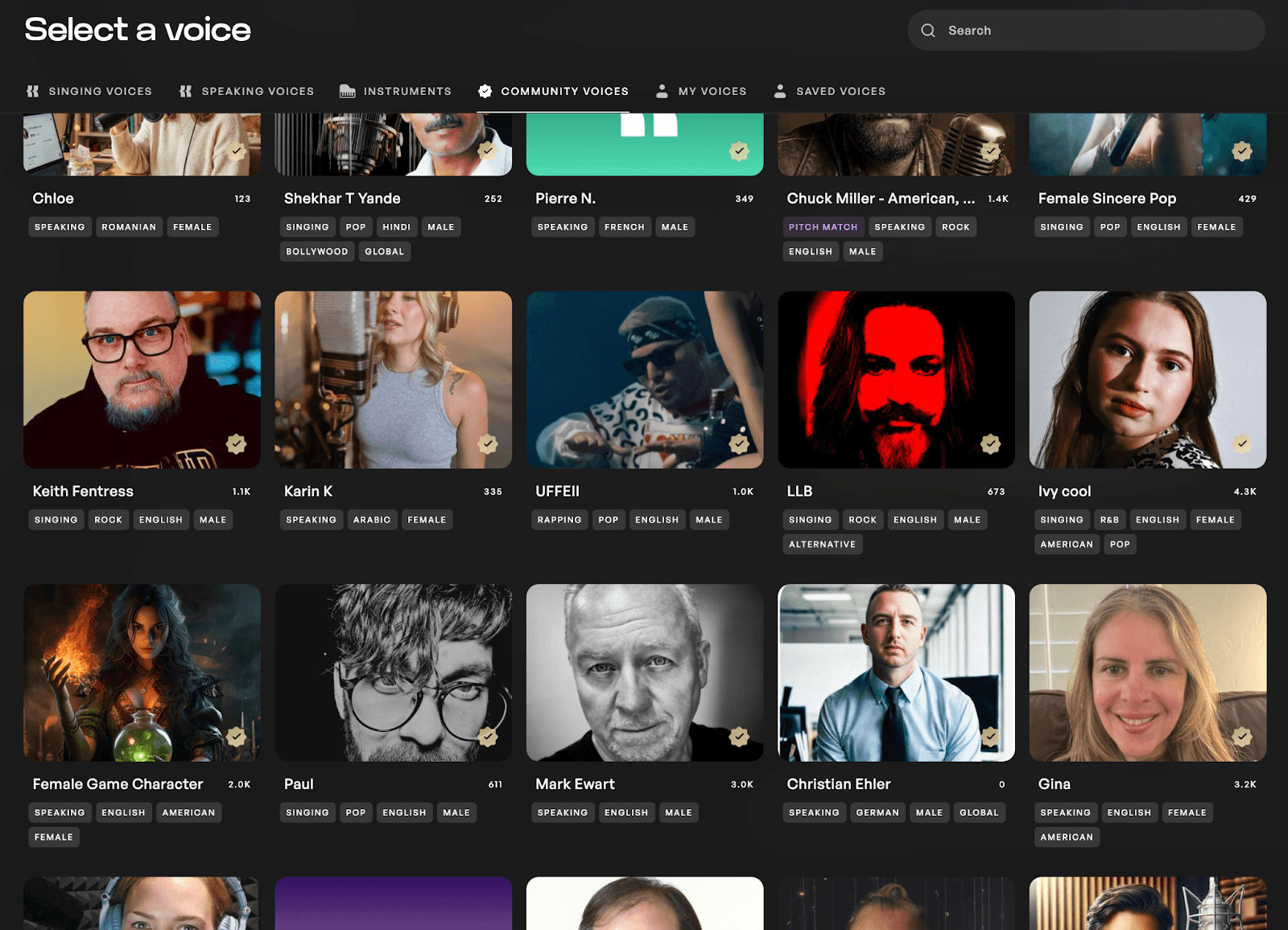
Kits AI के सबसे खास पहलुओं में से एक इसका नैतिक रूप से सोर्स किए गए वॉयस मॉडल्स का उपयोग करना है। असली कलाकारों द्वारा योगदान की गई 150 से अधिक रॉयल्टी-फ्री आवाज़ों के साथ, यह प्लेटफॉर्म यह सुनिश्चित करता है कि वोकलिस्ट्स को Kits Earn प्रोग्राम के माध्यम से क्रेडिट मिले और उन्हें इसका भुगतान भी मिले। व्यावहारिक रूप से, अलग-अलग शैलियों और पृष्ठभूमि की विभिन्न आवाज़ों का उपयोग करने से केवल एक ही आवाज़ को बार-बार स्टैक करने की तुलना में अधिक रियलिस्टिक और आकर्षक क्वायर साउंड मिलता है। यूज़र्स कस्टम मॉडल्स को ट्रेन करने के लिए अपने खुद के वोकल सैंपल्स भी अपलोड कर सकते हैं या कस्टमाइज्ड क्वायर साउंड बनाने के लिए वॉयस क्लोनिंग का उपयोग कर सकते हैं, जिससे रचनात्मक संभावनाएं और भी बढ़ जाती हैं।
AI क्वायर जनरेटर के शैक्षिक अनुप्रयोग (Educational Applications)
AI क्वायर जनरेटर संगीत सिखाने और सीखने के तरीके में एक बड़ा बदलाव ला रहे हैं, जिससे ये छात्रों और शिक्षकों दोनों के लिए एक अमूल्य शैक्षिक उपकरण बन गए हैं। इन टूल्स को क्लासरूम में शामिल करके, शिक्षक व्यावहारिक और इंटरैक्टिव तरीके से कोरल संगीत (choral music) और कोरल अरेंजमेंट के बुनियादी सिद्धांतों को समझा सकते हैं। छात्र अपना खुद का क्वायर म्यूजिक बनाकर एक्सपेरिमेंट कर सकते हैं और यह देख सकते हैं कि क्वायर के वातावरण में विभिन्न हार्मनीज़ और वॉयस टाइप्स एक-दूसरे के साथ कैसे इंटरैक्ट करते हैं।
एक AI क्वायर जनरेटर की मदद से, म्यूजिक थ्योरी के कॉन्सेप्ट्स एकदम आसान हो जाते हैं। विद्यार्थी तुरंत इंटरवल्स, वॉयसिंग या वोकल रेंज बदलने का प्रभाव सुन सकते हैं, जिससे वास्तविक क्वायर म्यूजिक में हार्मनी कैसे काम करती है, इसके बारे में उनकी समझ गहरी होती है। यह त्वरित फीडबैक उन्हें नए प्रयोग करने और रचनात्मकता बढ़ाने के लिए प्रोत्साहित करता है, जिससे छात्र अपने स्वयं के कोरल अरेंजमेंट्स को आज़मा सकते हैं और रियल टाइम में उसके परिणाम देख सकते हैं।
चाहे पारंपरिक कोरल वर्क्स का विश्लेषण करना हो या ओरिजिनल ट्रैक्स कम्पोज़ करना हो, AI क्वायर जनरेटर संगीत की पढ़ाई को अधिक आकर्षक और सुलभ बनाते हैं। ये अगली पीढ़ी के संगीतकारों को म्यूजिक थ्योरी और अरेंजमेंट में एक मजबूत आधार प्रदान करते हुए, क्वायर म्यूजिक की असीम संभावनाओं को तलाशने के लिए सशक्त बनाते हैं।
AI क्वायर जनरेटर के साथ रैपिड प्रोटोटाइपिंग (Rapid Prototyping)
AI क्वायर जनरेटर की सबसे बड़ी खूबियों में से एक है रैपिड प्रोटोटाइपिंग के माध्यम से रचनात्मक प्रक्रिया को गति देने की क्षमता। म्यूजिक प्रोड्यूसर्स के लिए, इसका मतलब है कि वे वोकल अरेंजमेंट का स्केच तैयार कर सकते हैं, हार्मनीज़ का टेस्ट कर सकते हैं, और घंटों या दिनों के बजाय कुछ ही मिनटों में विभिन्न संगीत शैलियों को आज़मा सकते हैं।
एक AI क्वायर के साथ, आप तुरंत कई वोकल अरेंजमेंट्स को आज़मा सकते हैं, वॉयस मॉडल्स बदल सकते हैं, और जब तक आपको अपने प्रोजेक्ट के लिए सटीक साउंड न मिल जाए, तब तक हार्मनीज़ को फाइन-ट्यून कर सकते हैं। यह स्पीड और फ्लेक्सिबिलिटी म्यूजिक प्रोडक्शन को पूरी तरह बदल देती है, जिससे आप बिना किसी तकनीकी बाधा के अपने विचारों पर काम कर सकते हैं, अपने क्वायर संगीत को बेहतर बना सकते हैं और नई दिशाओं में प्रयोग कर सकते हैं।
चाहे आप पॉप ट्रैक पर काम कर रहे हों, सिनेमाई स्कोर (cinematic score) पर, या गॉस्पेल क्वायर अरेंजमेंट पर, AI क्वायर जनरेटर आपके संगीत को विभिन्न शैलियों और स्टाइल्स के अनुकूल बनाना आसान बनाते हैं। कोरल अरेंजमेंट्स का तेजी से प्रोटोटाइप बनाने की क्षमता म्यूजिक प्रोड्यूसर्स को क्रिएटिव और हमेशा प्रेरित रहने में मदद करती है।
AI क्वायर जनरेटर्स के साथ रचनात्मकता का विस्तार
AI क्वायर जनरेटर म्यूजिक प्रोड्यूसर्स और कम्पोज़र्स के लिए रचनात्मक स्वतंत्रता के नए रास्ते खोलते हैं। लाइव क्वायर के लिए अरेंजमेंट करने की पारंपरिक बाधाओं को दूर करके, ये इनोवेटिव टूल्स आपको ऐसी हार्मनीज़, वॉयसिंग और म्यूजिक स्टाइल्स का पता लगाने देते हैं जिन्हें मैन्युअल रूप से हासिल करना कठिन या असंभव भी हो सकता है।
AI क्वायर के साथ, आप लीक से हटकर कोरल अरेंजमेंट्स के प्रयोग करने, अनोखे वॉयस मॉडल्स को मिलाने, और क्वायर साउंड की पारंपरिक सीमाओं को पार करने के लिए पूरी तरह स्वतंत्र हैं। चाहे आप खूबसूरत, सिनेमाई हार्मनीज़ बनाना चाहते हों या लीक से हटकर वोकल टेक्सचर्स, संभावनाएं सचमुच अनंत हैं।
यह इनोवेटिव फीचर्स का सेट म्यूजिक प्रोड्यूसर्स को कुछ अलग सोचने के लिए प्रोत्साहित करता है, जिसके परिणामस्वरूप बेहतरीन कोरल अरेंजमेंट्स तैयार होते हैं जो भीड़ से अलग दिखते हैं। AI क्वायर जनरेटर केवल पारंपरिक क्वायर साउंड को कॉपी करने के लिए नहीं हैं, बल्कि ये संगीतमय अभिव्यक्ति के नए रूपों को प्रेरित करने और आपके सबसे महत्वाकांक्षी रचनात्मक दृष्टिकोण को साकार करने में मदद करने के बारे में हैं।
Kits AI के साथ AI क्वायर कैसे बनाएं — स्टेप बाय स्टेप
यहाँ Kits AI के Harmony Generator और Layers फीचर्स का उपयोग करके क्वायर अरेंजमेंट बनाने का सटीक वर्कफ़्लो दिया गया है।
स्टेप 1: अपना सोर्स वोकल तैयार करें
शुरुआत एक साफ और बिना किसी इफेक्ट (ड्राई) वोकल रिकॉर्डिंग के साथ करें, जिसमें कोई रीवरब, डिले या कमरे का शोर (room noise) न हो। मोनो WAV या MP3 फ़ाइल का उपयोग करने की सलाह दी जाती है, क्योंकि यह AI को प्रोसेस करने के लिए सबसे बेहतर इनपुट प्रदान करती है। आप अपने AI क्वायर के आधार के रूप में खुद की आवाज़ का उपयोग कर सकते हैं या वोकल सैंपल्स इम्पोर्ट कर सकते हैं, जिससे पर्सनल या मिक्स वोकल अरेंजमेंट्स की सुविधा मिलती है। शुरुआत करने से पहले अपने ट्रैक का स्केल (Key) जान लेना भी जरूरी है, क्योंकि सटीक हार्मनी जनरेशन काफी हद तक इसी स्टेप पर निर्भर करती है। आपका इनपुट वोकल जितना साफ और कंट्रोल में होगा, आपका अंतिम क्वायर साउंड उतना ही नेचुरल और ओरिजिनल सुनाई देगा।
स्टेप 2: Harmony या Layers मोड चुनें
Kits AI आपके क्वायर को बेहतर बनाने के लिए दो पूरक (complementary) तरीके प्रदान करता है। Harmony Generator को विभिन्न वॉयस मॉडल्स और संगीत के इंटरवल्स का उपयोग करके चार अलग-अलग हार्मनी पार्ट्स बनाने के लिए डिज़ाइन किया गया है, जो इसे पारंपरिक SATB-स्टाइल अरेंजमेंट्स के लिए आदर्श बनाता है। इसके विपरीत, Layers फीचर आपको एक ही पार्ट पर सात आवाज़ों को स्टैक करने की अनुमति देता है, जिससे आपके साउंड को अधिक चौड़ाई और डेंसिटी मिलती है।
सबसे रियलिस्टिक और शानदार परिणामों के लिए, कई प्रोड्यूसर्स दोनों तरीकों को मिला देते हैं; वे पहले हार्मनीज़ जेनरेट करते हैं और फिर प्रत्येक पार्ट के ऊपर एडिशनल आवाज़ों की लेयरिंग करते हैं। एक रियलिस्टिक और भावनात्मक रूप से आकर्षक क्वायर साउंड पाने के लिए आवाज़ों की सही लेयरिंग करना बेहद ज़रूरी है।
स्टेप 3: अपनी आवाज़ें चुनें
Kits AI आपको 150 से अधिक वॉयस मॉडल्स का एक डाइवर्स एक्सेस देता है, जिसे पिच रेंज, जेंडर और स्टाइल के आधार पर फ़िल्टर किया जा सकता है। क्वायर बनाते समय, कंट्रास्ट और बैलेंस के संदर्भ में सोचना महत्वपूर्ण है। विभिन्न वॉयस टाइप्स और टोन का मिक्स उपयोग करने से एक अधिक नेचुरल ग्रुप साउंड बनाने में मदद मिलती है, जबकि सिर्फ एक ही वॉयस मॉडल का अत्यधिक उपयोग करने से परिणाम थोड़ा बनावटी लग सकता है।
एक बेहतर तरीका यह है कि आप अपने अरेंजमेंट को ऊपर से नीचे की ओर बनाएं, यानी हाई रेंज वाली आवाज़ों से शुरू करें और धीरे-धीरे उनके नीचे लोअर रेंज की आवाज़ें जोड़ते जाएं।
स्टेप 4: हार्मनी इंटरवल्स और स्केल सेट करें
यहीं से आपके अरेंजमेंट को एक संगीतमय आकार मिलना शुरू होता है। सबसे पहले अपने ट्रैक की सही स्केल (Key) सेट करें, क्योंकि यह सुनिश्चित करता है कि जेनरेट की गई सभी हार्मनीज़ आपके कंपोज़िशन के साथ पूरी तरह से मेल खाएं। इसके बाद, प्रत्येक वॉयस को स्पेसिफिक इंटरवल्स असाइन करें, जैसे कि लीड वोकल से तीसरा सुर ऊपर, छठा नीचे या एक ऑक्टेव नीचे।
आप pitch correction स्ट्रेंथ और स्मूथिंग जैसे मापदंडों को भी फाइन-ट्यून कर सकते हैं। इन एडजस्टमेंट्स को थोड़ा हल्का रखना ही सबसे नेचुरल रिजल्ट्स देता है, क्योंकि अत्यधिक आक्रामक सेटिंग्स से आवाज़ थोड़ी बनावटी या रोबोटिक लग सकती है।
स्टेप 5: कन्वर्ट और एक्सपोर्ट करें
एक बार जब सब कुछ सेट हो जाए, तो बस Convert पर क्लिक करें और Kits AI को आपके लिए क्वायर जेनरेट करने दें। यह प्लेटफॉर्म आपको अलग-अलग वोकल स्टेम्स (stems) और अरेंजमेंट का एक मिक्स प्रीव्यू, दोनों प्रदान करेगा।
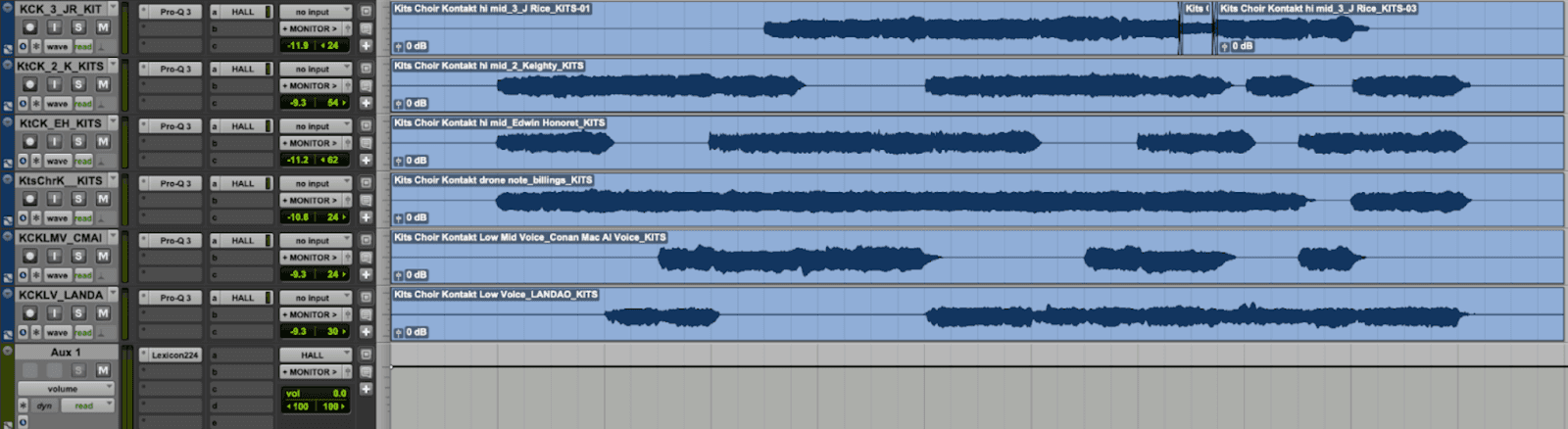
स्टेम्स को अपने DAW में एक्सपोर्ट करने के बाद, आप रीवरब, कम्प्रेशन और पैनिंग के साथ अंतिम साउंड को फाइनल शेप देना शुरू कर सकते हैं। एक विशेष रूप से प्रभावी तकनीक सभी आवाज़ों पर एक ही हॉल रीवरब (hall reverb) लागू करना है, जो उन्हें एक साथ मिलाकर एक बेहतरीन साउंड स्पेस देता है और वास्तविक लाइव परफॉर्मेंस का अहसास कराता है। इसके अतिरिक्त, आप सॉफ्टवेयर के भीतर बिल्ट-इन FX टूल्स का उपयोग करके क्वायर साउंड को और बेहतर और कस्टमाइज़ कर सकते हैं, जिससे प्रोफेशनल-क्वालिटी वाले परिणाम आसानी से प्राप्त होते हैं।
एकदम रियलिस्टिक AI क्वायर साउंड के लिए टिप्स
एक्सपोर्ट करने से पहले की चेकलिस्ट
अपना अंतिम क्वायर जेनरेट करने से पहले, यह सुनिश्चित कर लें कि आपकी सेटिंग्स ऑप्टिमाइज्ड हैं या नहीं। आपका सोर्स वोकल साफ, बिना इफेक्ट के और शोर-मुक्त होना चाहिए, और हार्मोनिक विसंगतियों से बचने के लिए ट्रैक का सही स्केल (Key) चुना जाना चाहिए। विभिन्न पिच रेंजों में अलग-अलग वॉयस मॉडल्स का उपयोग करना और मास्टर मिक्स के साथ इंडिविजुअल स्टेम्स एक्सपोर्ट करने की योजना बनाना भी महत्वपूर्ण है। इस स्टेज पर सिर्फ पेन (panning) सेटिंग्स में किया गया छोटा सा बदलाव भी आपके क्वायर को बहुत व्यापक और नेचुरल बना सकता है।
मिक्सिंग टिप्स
अपने स्टेम्स एक्सपोर्ट करने के बाद, थोड़ी समझदारी से की गई मिक्सिंग आपको एक बेहतरीन और रियलिस्टिक रिजल्ट दे सकती है। एक ही वॉयस मॉडल को दोहराने के बजाय विभिन्न वॉयस मॉडल्स का उपयोग करने से एक अधिक समृद्ध और रियलिस्टिक इफेक्ट मिलता है। अपने अरेंजमेंट को ऊपर से नीचे की ओर बनाना पारंपरिक कोरल तकनीकों को दर्शाता है, जबकि रणनीतिक पैनिंग, जिसमें हाई वोकल्स को लेफ्ट-राइट में फैलाया जाता है और लो वोकल्स को बीच में रखा जाता है, उसकी गहराई को बढ़ाता है।
सभी ट्रैक्स पर एक ही रीवरब लागू करने से प्रत्येक आवाज़ एक ही साउंड स्पेस में महसूस होती है, जो एक असली लाइव परफॉर्मेंस के अहसास को मजबूत करती है। हल्का सा पिच करेक्शन बिना किसी बनावटीपन के हर सुर को सही सुर में रख सकता है, और Harmony व Layers दोनों का उपयोग करके पार्ट्स को डबल करना, वास्तविक क्वायर में एक सेक्शन में कई गायकों की मौजूदगी का अहसास कराता है।
AI क्वायर जनरेटर बेस्ट प्रैक्टिसेस (Best Practices)
अपने AI क्वायर के साथ सबसे रियलिस्टिक और आकर्षक परिणाम प्राप्त करने के लिए, कुछ बेस्ट प्रैक्टिसेस का पालन करना महत्वपूर्ण है। अपने मनचाहे साउंड के लिए सही AI मॉडल्स चुनने से शुरुआत करें, अलग-अलग वोकल रेंजों और टिम्ब्रेस (timbres) को मिक्स करने से आपके कोरल अरेंजमेंट में गहराई और ओरिजिनैलिटी आ सकती है। हार्मनी इंटरवल्स, पिच करेक्शन और स्मूथिंग जैसे मापदंडों को बारीकी से ट्यून करने से आपको प्योरिटी और नेचुरलनेस के बीच सही संतुलन बनाने में मदद मिलेगी।
इस बात पर विचार करें कि आपके क्वायर का उपयोग किस संदर्भ में किया जाना है। किसी पॉप ट्रैक के बैकग्राउंड वोकल्स के लिए, आप शायद एक टाइट और अच्छी तरह मिक्स साउंड चाहेंगे, जबकि लाइव परफॉर्मेंस या सिनेमाई स्कोर्स के लिए अधिक वाइब्रेंट और डायनामिक अरेंजमेंट बेहतर हो सकता है। हमेशा ध्यान से सुनें कि हार्मनीज़ और वोकल्स एक-दूसरे के साथ कैसे तालमेल बिठा रहे हैं, और जब तक आपको मनचाहा साउंड न मिल जाए, तब तक अलग-अलग कॉम्बिनेशन के साथ प्रयोग करने से न कतराएं।
इन बेस्ट प्रैक्टिसेस को अपनाकर, आप यह सुनिश्चित करेंगे कि आपके AI क्वायर अरेंजमेंट्स न केवल संगीतमय रूप से बेहतरीन हों, बल्कि आपके ओवरऑल म्यूजिक प्रोडक्शन में भी फिट बैठें।
AI क्वायर जनरेटर कहाँ सबसे अधिक उपयोगी हैं — वास्तविक उपयोग के मामले
AI क्वायर जनरेटर विभिन्न प्रोडक्शन क्षेत्रों में रचनात्मक संभावनाओं के नए द्वार खोलते हैं। फिल्म और टेलीविजन स्कोरिंग में, इनका उपयोग लाइव कलाकारों के बिना तेजी से सिनेमाई क्वायर टेक्सचर्स बनाने के लिए किया जा सकता है। पॉप और R&B प्रोडक्शन में, वे प्रोड्यूसर्स को बेहतरीन बैकिंग हार्मनीज़ बनाने की अनुमति देते हैं जो मुख्य वोकल को सपोर्ट करती हैं।
गॉस्पेल और भक्ति संगीत में भी ये उतने ही मूल्यवान हैं, जहाँ केवल एक वोकल परफॉर्मेंस से पूरे SATB अरेंजमेंट जेनरेट किए जा सकते हैं। सिंगर-कम्पोज़र्स के लिए, ये टूल्स भारी बजट खर्च किए बिना रिकॉर्डिंग को एक बेहतरीन गहराई और नया आयाम देने का आसान तरीका प्रदान करते हैं।
गेम ऑडियो और एम्बिएंट म्यूजिक में, AI-जेनरेटेड क्वायर का उपयोग शानदार साउंडस्केप्स डिजाइन करने के लिए किया जा सकता है। ये डेमो प्रोडक्शन में भी एक व्यावहारिक भूमिका निभाते हैं, जहाँ पूरे रिकॉर्डिंग सेशन पर काम शुरू करने से पहले एक क्विक कोरल अरेंजमेंट तैयार कर आइडिया शेयर करने में मदद मिलती है।
सिर्फ हार्मनी से आगे — पूरा Kits AI वोकल वर्कफ़्लो
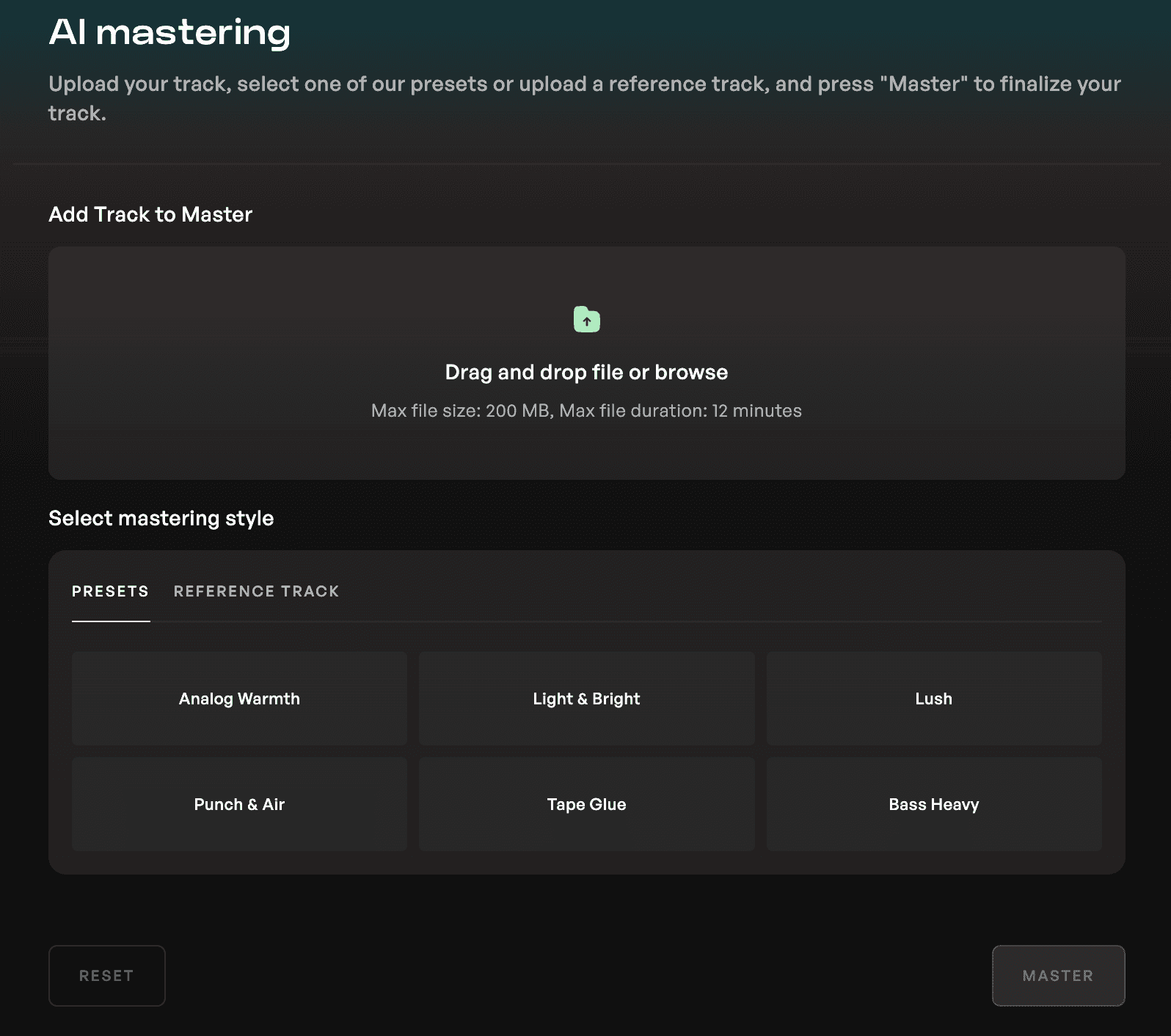
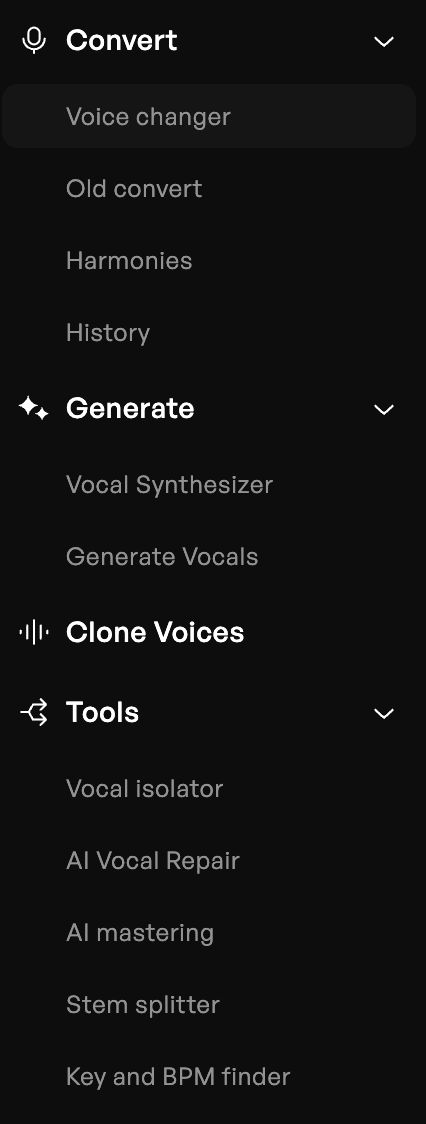
एक बार जब आपका क्वायर अरेंजमेंट पूरा हो जाता है, तो Kits AI आपको अन्य एडिशनल टूल्स भी देता है जिससे आप प्लेटफॉर्म छोड़े बिना अपना प्रोडक्शन पूरा कर सकते हैं। आप AI Vocal Repair का उपयोग करके रिकॉर्डिंग को क्लीन कर सकते हैं, और AI Mastering से अपने ट्रैक को फाइनल टच दे सकते हैं।
यह इंटीग्रेटेड अप्रोच प्रोड्यूसर्स को एक ही वर्कफ़्लो के भीतर, शुरुआती वोकल आइडिया से लेकर एक शानदार फाइनल ट्रैक तक आसानी से काम करने की सुविधा देता है।
AI क्वायर जनरेटर के विकल्प: Kits AI की तुलना कैसे करें
आज कई AI क्वायर टूल्स उपलब्ध हैं, जिनमें से प्रत्येक की अपनी ताकत और सीमाएं हैं। Kits AI पूरी तरह से ब्राउज़र-बेस्ड होने और किसी डाउनलोड की आवश्यकता न होने के कारण खुद को अलग करता है, साथ ही यह रिसोर्सफुल वॉयस मॉडल्स की एक बड़ी लाइब्रेरी भी प्रदान करता है। इसका हार्मनी जनरेशन, लेयरिंग और इन-बिल्ट प्रोडक्शन टूल्स का शानदार कॉम्बिनेशन इसे वोकल रिकॉर्डिंग पर काम करने वाले प्रोड्यूसर्स के लिए बेहद अनुकूल बनाता है।
क्या आप अपना AI क्वायर बनाने के लिए तैयार हैं? मुफ़्त में शुरू करें।
AI क्वायर जनरेटर्स ने आधुनिक प्रोड्यूसर्स के लिए संभावनाओं को पूरी तरह से बदल दिया है। जिस काम के लिए कभी भारी व्यवस्थाओं की जरूरत होती थी, उसे अब सिर्फ एक वोकल और कुछ क्रिएटिव डिसीजंस के साथ कुछ ही मिनटों में हासिल किया जा सकता है।
150 से अधिक वॉयस मॉडल्स की लाइब्रेरी, पूरी तरह से ब्राउज़र-बेस्ड वर्कफ़्लो और शुरू करने के लिए एक फ्री प्लान के साथ, Kits AI काम को और आसान बनाता है ताकि आप अन्य चीज़ों के बजाय संगीत बनाने पर अधिक ध्यान केंद्रित कर सकें।
Kits AI के choir and harmony tools को मुफ्त में आज़माएं, कोई डाउनलोड नहीं, कोई क्रेडिट कार्ड नहीं, बस बेहतरीन परिणाम।
AI क्वायर जनरेटर्स के बारे में अक्सर पूछे जाने वाले प्रश्न
AI क्वायर जनरेटर क्या है?
एक AI क्वायर जनरेटर एक सॉफ्टवेयर टूल है जो किसी वोकल रिकॉर्डिंग से लेयर्ड कोरल हार्मनीज़ बनाने के लिए आर्टिफिशियल इंटेलिजेंस का उपयोग करता है, जिससे वास्तविक लाइव क्वायर की आवश्यकता के बिना ही कई गायकों के गाने का प्रभाव मिलता है।
AI क्वायर जनरेटर कितना रियलिस्टिक है?
आधुनिक AI क्वायर जनरेटर अत्यधिक रियलिस्टिक परिणाम दे सकते हैं, ऐसे साउंड्स जेनरेट कर सकते हैं जो काफी हद तक असली लाइव क्वायर से मेल खाते हैं, खासकर जब विविध वॉयस मॉडल्स और साफ रिकॉर्डिंग्स का उपयोग किया जाता है। सही लेयरिंग और मिक्सिंग से इसकी क्वालिटी काफी बेहतर हो जाती है।
क्या एक AI क्वायर जनरेटर हार्मनीज़ बना सकता है?
हाँ, हार्मनीज़ जेनरेट करना इसका प्राथमिक कार्य है। समृद्ध, अलग-अलग पार्ट्स वाले अरेंजमेंट्स बनाने के लिए यूज़र्स म्यूजिक इंटरवल्स सेट कर सकते हैं और अलग-अलग वॉयस मॉडल्स असाइन कर सकते हैं।
क्या AI इंसानी आवाज़ की हार्मनीज़ की बिल्कुल सटीक नकल कर सकता है?
AI इंसानी हार्मनीज़ की हुबहू नकल करने के बेहद करीब पहुँच सकता है, खासकर तब जब कई वॉयस मॉडल्स का उपयोग किया जाता है और सावधानी से पिच करेक्शन किया जाता है। टोन और टाइमिंग में छोटे बदलाव सिंथेटिक और इंसानी परफॉर्मेंस के बीच के अंतर को पाट देते हैं।
AI क्वायर जनरेटर का उपयोग करने के क्या फायदे हैं?
इसके मुख्य फायदे स्पीड, कम लागत और क्रिएटिव फ्लेक्सिबिलिटी हैं। प्रोड्यूसर्स पारंपरिक चुनौतियों के बिना कुछ ही मिनटों में जटिल क्वायर अरेंजमेंट्स बना और उन्हें सुधार सकते हैं।
आप Kits AI के साथ क्वायर कैसे बनाते हैं?
क्वायर बनाने के लिए, आप बस एक साफ वोकल रिकॉर्डिंग अपलोड करते हैं, की (Scale) सेट करते हैं, अपने वॉयस मॉडल्स चुनते हैं, हार्मनी इंटरवल्स असाइन करते हैं और आउटपुट जेनरेट करते हैं। इसके बाद आउटपुट फाइल्स को एक्सपोर्ट किया जा सकता है और आपके DAW में मिक्स किया जा सकता है।
प्रोड्यूसर्स के लिए सबसे अच्छा AI क्वायर टूल कौन सा है?
उन प्रोड्यूसर्स के लिए जो वोकल रिकॉर्डिंग पर काम करते हैं और बेहतर फ्लेक्सिबिलिटी चाहते हैं, Kits AI वर्तमान में उपलब्ध सबसे आसान और कंप्लीट वर्कफ़्लो प्रदान करता है।